

What is MCP? A plain-English guide to the Model Context Protocol for consulting firms, and what to check before you connect your data to your AI.
Most consulting firm leaders have heard of MCP, short for Model Context Protocol, far more often than anyone has explained it. You don’t need the technical detail to make good decisions about it. So what is MCP, and what should your firm do about it? Here it is in plain English.
What is MCP (Model Context Protocol)?
MCP (Model Context Protocol) is an open standard that connects AI tools like ChatGPT, Claude and Gemini to the software a firm already runs. Through one common format, an AI tool can read data from those systems and, where allowed, take actions in them, instead of a custom integration for every pairing.
Anthropic released MCP in November 2024 as open source, which means any company can use and build on it for free. AI models at the time were cut off from the systems where business data lives. For a consulting firm, that's the difference between an AI tool that writes a decent email and one that can tell you which projects ran over budget. A protocol is just an agreed set of rules for how two systems talk, and MCP's rules work like a universal adapter between any AI tool and any system.
No single AI company controls MCP, either. Anthropic handed it to an independent nonprofit foundation in December 2025, with OpenAI among the co-founders, so a connector built once works across rival AI tools instead of locking your firm into one of them.
How does MCP work? Hosts, servers and connectors in plain English
Each app connects to your AI tool through its own MCP connector.
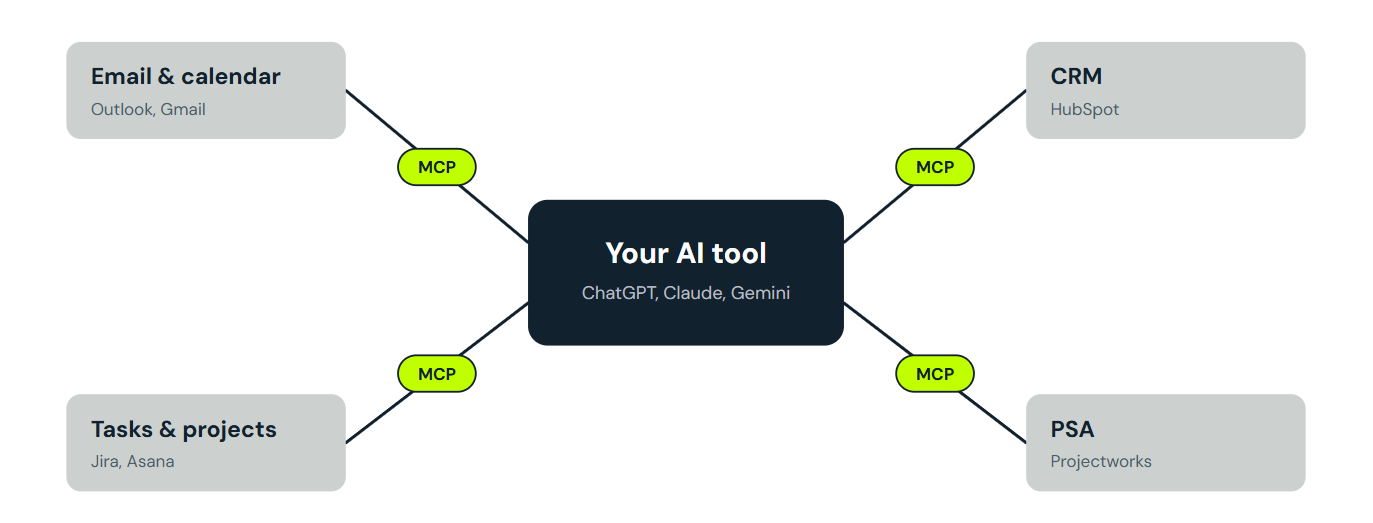
Switch on the connectors, and your AI tool can read from every app in one conversation.
What is an MCP server?
Every MCP connection has two sides. On one side is an MCP server, a small piece of software each app’s maker runs to tell AI tools what its system can offer. Some of that is things to look up, like the open tickets on a project or the notes from Tuesday's client call. Some of it is things to do, like creating a task or updating a client’s details. On the other side is the AI app your team works in, such as ChatGPT, Claude, Gemini or Microsoft Copilot. In the jargon, that app is the host, and each link it opens to a server is called a client.
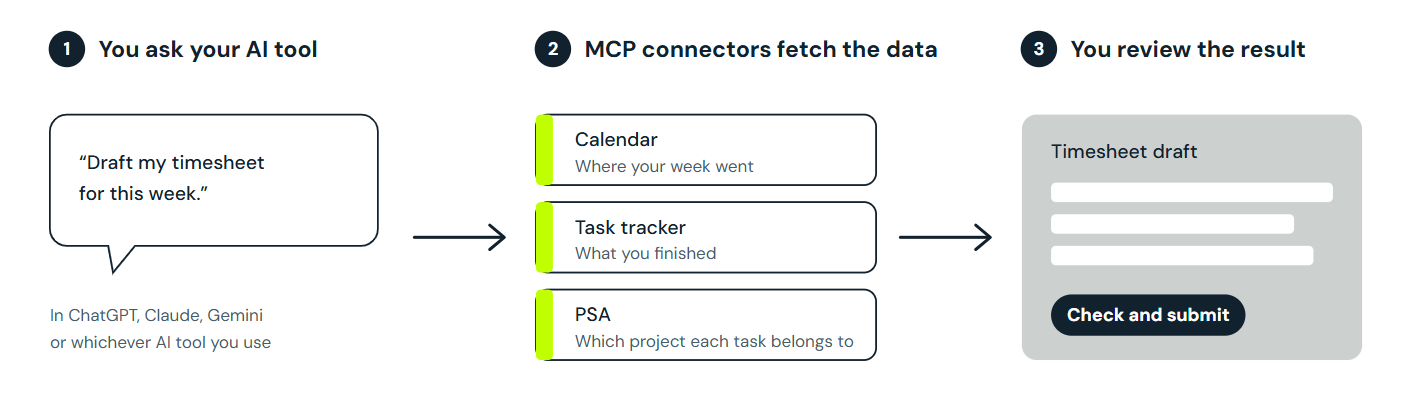
So what happens when you ask your AI tool for something?
Connector, integration, MCP server: three names for one thing
Part of the confusion is that the same thing goes by three names. Claude calls them connectors and ChatGPT calls them apps. Software companies tend to list them under integrations, while the technical name is MCP server. For a firm deciding what to switch on, all three describe a link that lets an AI tool reach one of your systems. For the official connectors most firms will use, the server runs on the software company's own systems rather than on a computer in your office. Connectors for big platforms like Microsoft 365, Google Workspace and Slack typically need nothing more than a sign-in.
MCP vs API: what's actually different?
Most business software already has an API, a doorway that lets developers connect one system to another by writing code, so it's reasonable to ask why MCP needs to exist. For a firm leader, the difference shows up in budgets and in who signs off. A connection built on an API only does the jobs a developer coded it for, so every new job is another piece of work. An MCP connector can take on new questions the day it's switched on, which turns the decision from whether you can afford to build something into whether you should allow it. That’s a decision about who can see and change what, and your COO can make it.
The MCP connectors your firm probably already has
Chances are the software your firm already uses has an MCP connector, and switching it on is a setting, not a purchase. HubSpot builds and maintains its own connector, and it follows the permissions each user already has in HubSpot, so a sales rep sees their own deals rather than the whole pipeline. Granola's connector works the same way, with each person signing in with their own account instead of everyone sharing one API key, which works like a single firm-wide password.
On its own, though, each connector only reaches its own system. An AI tool connected to your calendar knows where someone spent their week but not which project budget that time belongs to, and the meeting-notes connector knows what the client asked for without knowing who's free to deliver it. The value turns up when the same conversation can reach several of these systems alongside the project, timesheet and resourcing data in your PSA, the professional services automation software that runs delivery, and each row below shows one such pairing.
MCP’s main benefit is getting your tools talking to each other, with your AI tool doing the translating.
For example, here’s how each one could work alongside Projectworks:
What it looks like in practice
Timesheets are the obvious first workflow. In the timesheet and resourcing demos from our back-office admin podcast, an AI tool drafted a timesheet from the tasks a consultant had ticked off in Asana or Jira, so their job shrank to checking a draft instead of rebuilding the week from memory. Our guide to drafting timesheets with AI covers the setup.
Resource plans come next, because staffing changes get agreed in meetings and then wait for someone to update the plan. The same podcast episode showed an AI tool reading the notes from a call and updating the resource plan from them.
Is MCP safe? Permissions, approvals and what to ask
MCP is only as safe as the way each server and AI tool is built, and the MCP specification, the official rulebook for the protocol, says so directly. It expects users to understand and agree to what data gets accessed, but admits the protocol can't enforce that on its own, so asking permission and limiting access is left to whoever builds the server and the AI tool. It also warns that a server's description of its own tools can't be taken at face value unless the server comes from a source you trust. That's the practical reason to connect official servers only.
What MCP won't do for you
MCP connects an AI tool to your data, but it doesn't make the AI's answers correct, so someone who knows the work still needs to check them. It won't fix messy data either. If timesheets go in late or project codes are a mess, the AI tool will read the mess faithfully. Each server also offers only what the company behind it chose to build. Xero's official server needs a settings file edited on someone's computer, and Intuit's QuickBooks Online server is still an early test version, so neither is a one-click connector yet. Whichever servers you connect, setting them up and keeping them under control is your firm’s job.
How to get started with MCP at your firm
Start with the AI tool your team already pays for, since a connector only helps where people work. If you're choosing, pick the one whose list of connectors already includes the systems your team uses most. Then run one weekly workflow, like timesheets or a client update, on official connectors in read-only mode, where the AI tool can look but not change anything. After a few weeks, add write actions, meaning anything that changes data, with confirmation on so a person approves each change before it's saved.
Your PSA belongs on that first list, because it holds the project data every other workflow leans on. The Projectworks MCP connects Projectworks to AI tools like Claude and ChatGPT, so your team can search, analyze and update Projectworks data from the AI tool, depending on their permissions, and it works alongside the other MCP-connected tools your firm already uses. Projectworks customers have invoiced $3B through the platform.

Read similar resources from Projectworks
It's the end of September and expenses got a lot of love this month, with a couple of big changes you can start using today and more on the way! We've also made updates across financial reporting, resourcing, HubSpot, and invoicing, dive in to see what's new.

E-invoicing sends invoices straight into your client's finance system via Peppol. Here's what NZ and Australian firms need to know and fix first.
Projectworks has spent 25 years inside consulting firms. Here’s why we built a Consulting CRM around the proposal, and where it goes next.