Free Pipeline Target Calculator AI (Claude Skill)

Turn your 2027 revenue goal into the proposals, pipeline and deals you need each quarter. Built for heads of sales, BD leads and founders who'd rather plan the year than guess at it.

Free Pipeline Target Calculator AI (Claude Skill)
Download

Download the Free Pipeline Target Calculator AI (Claude Skill) for free today

By subscribing you agree with our Privacy Policy.
Thank you! Your submission has been received!
Oops! Something went wrong while submitting the form.

What does the Pipeline Target Calculator do?
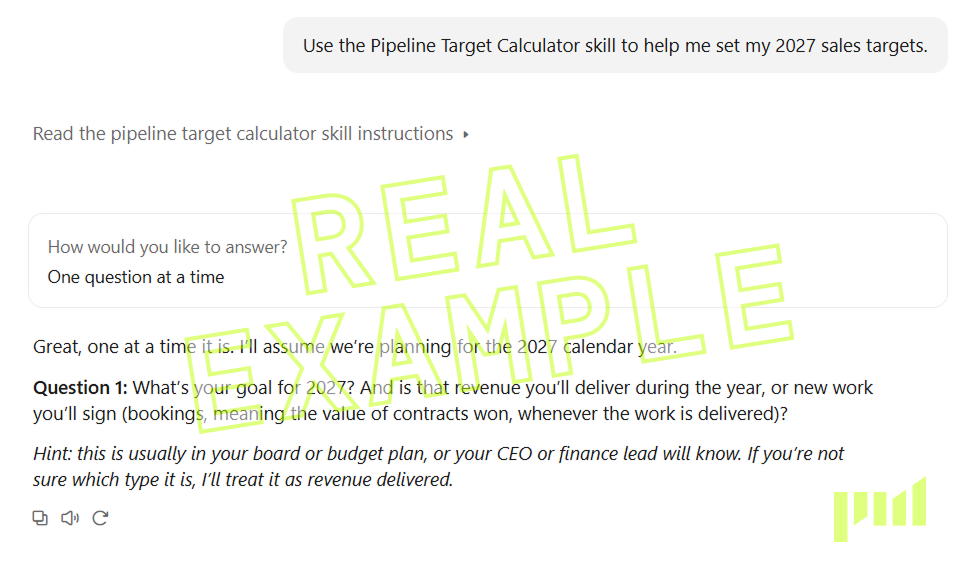
Start with one prompt. Paste the starter prompt into a new chat. The calculator explains what it’ll do, then asks whether you’d like to answer one question at a time or all at once.

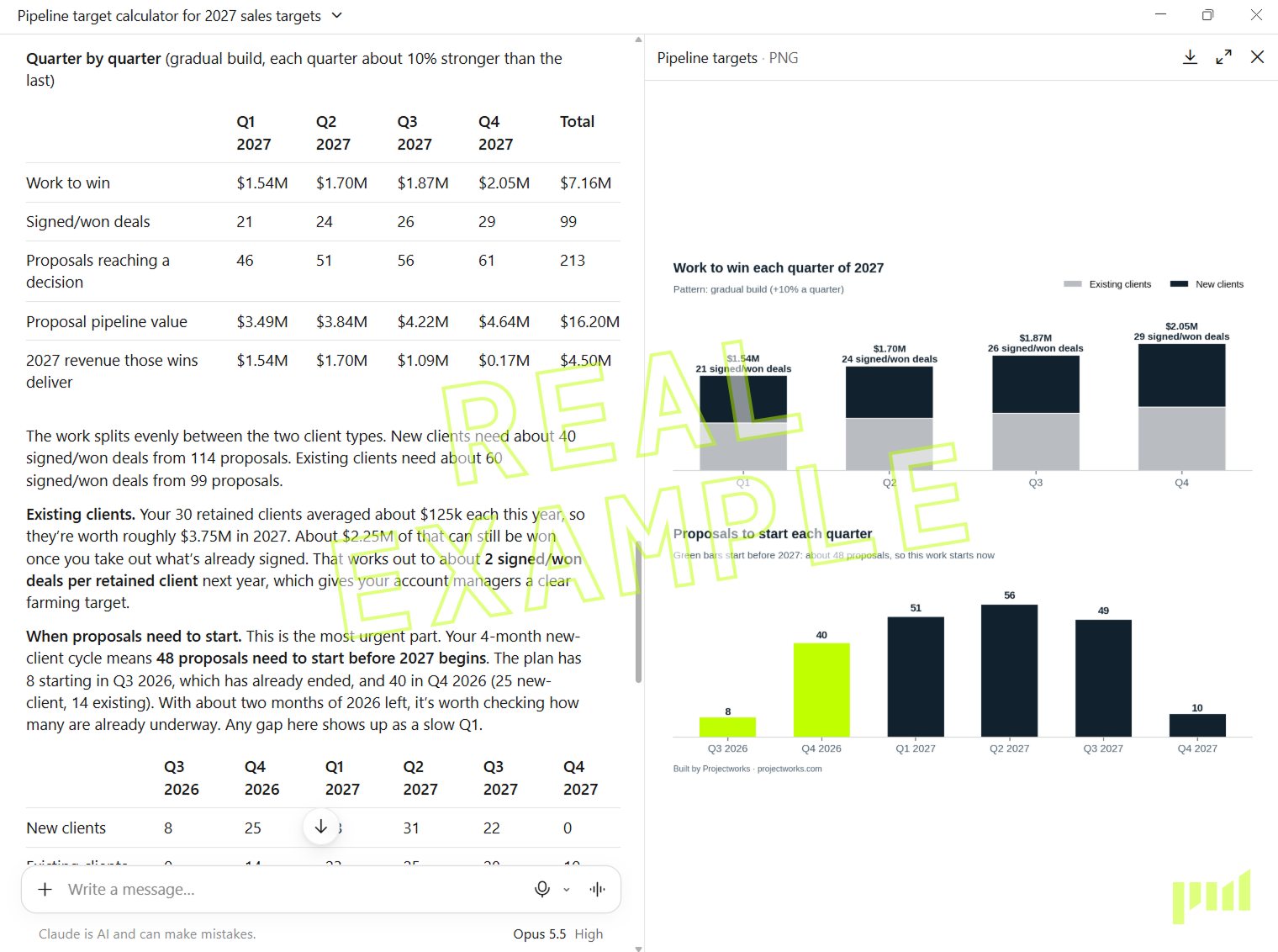
Plan for how consulting work actually lands. It asks how long your projects run, how soon they start after you win them, and how wins build through the year. A project you win in November barely touches this year’s revenue, and your targets account for that.

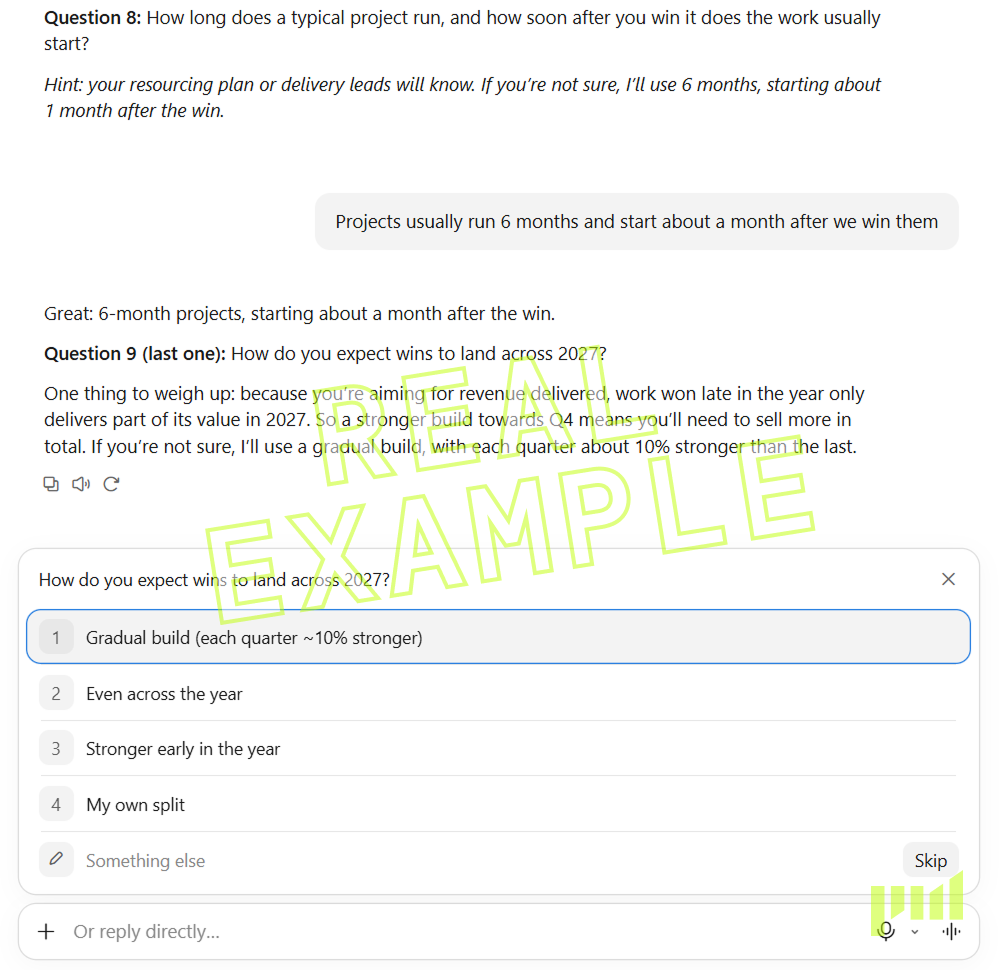
Get your 2027 targets, quarter by quarter. See the work to win, signed/won deals, proposals and pipeline for each quarter, plus a chart of the proposals you need to start before 2027 begins.


How the Pipeline Target Calculator works

  • Install the skill. Three minutes, and the steps are below.
  • Answer a few questions. Your goal, win rate, typical project size and how many clients you expect to keep. Don't know a number? Say so, and Claude suggests a starting point.
  • Get your targets. Claude flags anything that looks off, like a win rate that's suspiciously high, and shows you what to track each quarter.

How to install the Pipeline Target Calculator in Claude

What is a Claude Skill?

A Claude skill is a set of instructions you add to Claude once. After that, Claude knows how to run the target pipeline calculator whenever you ask.


You will need:

  • a Claude account (any plan works, including free)
  • about 3 minutes

Don't unzip the file!

Claude needs the .zip exactly as it downloaded. If Safari on your Mac has turned it into a folder, right-click the folder and choose Compress, then upload the .zip that creates.

Install in five steps

1. Turn on file creation.

Go to claude.ai/settings/capabilities and switch on Code execution and file creation. In newer versions of Claude it's called Create and edit files.

2. Open your skills.
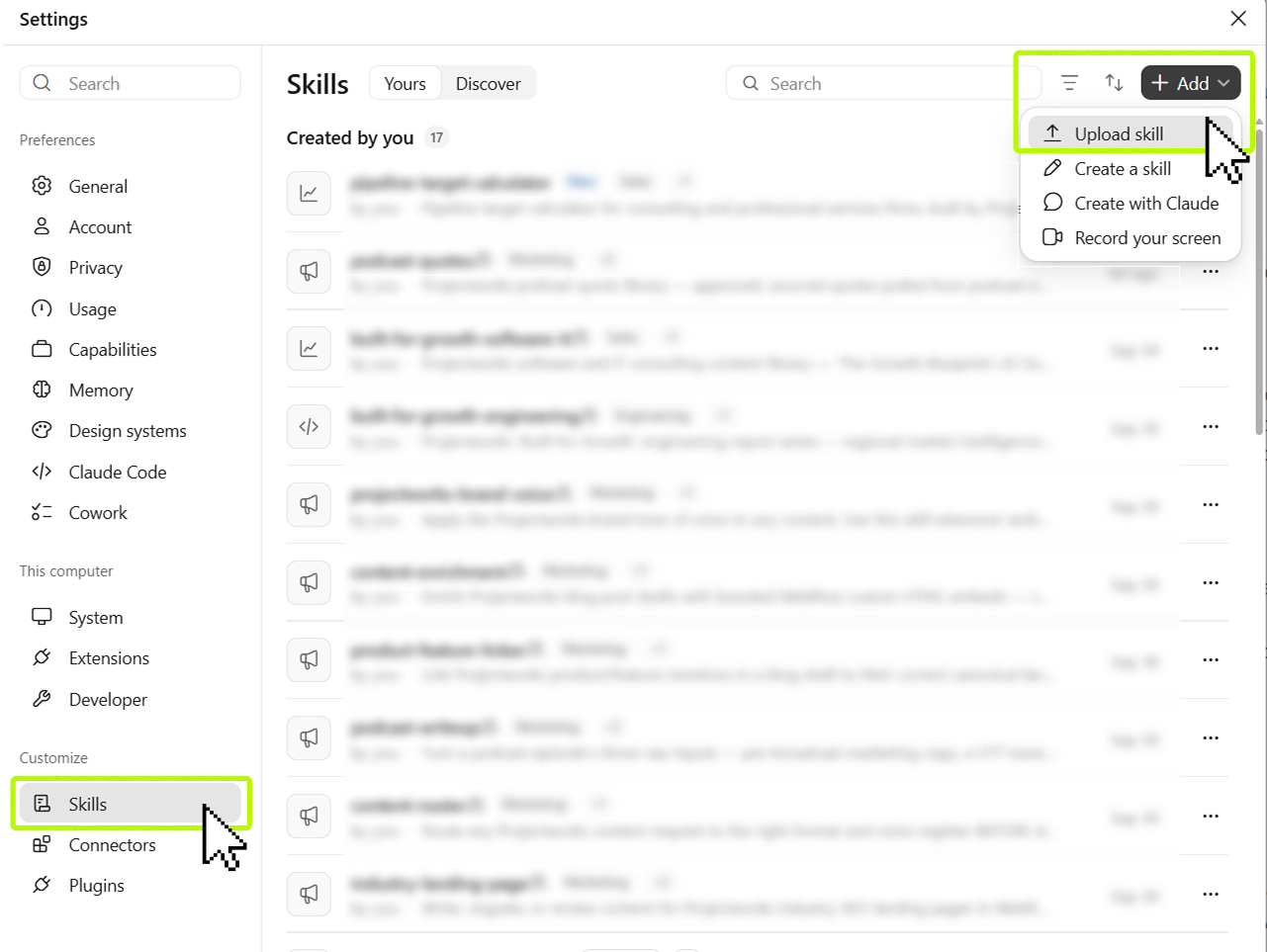
How to upload a claude skill

App: Click your user account on the bottom-left, then click Settings. Skills are found under Customize in the sidebar.

Web: Go to claude.ai/customize/skills.

3. Upload the skill.

Click + Add > Upload Skill.

Drag the pipeline-target-calculator.zip from your Downloads into the file uploader, or browse for the file.
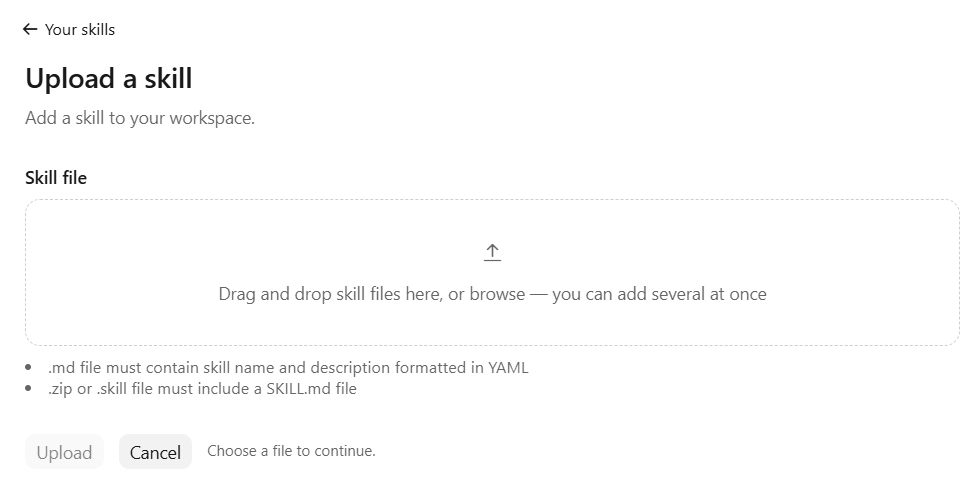
How to upload a Claude skill

4. Check it's on.

Pipeline Target Calculator should appear in your skills list. Make sure its toggle is on.

Pipeline Target Calculator Claude Skill

5. Start a new chat.

Try testing with the starter prompt below.

Copy this into a new chat (click the text to select it)

Use the Pipeline Target Calculator skill to help me set my 2027 sales targets.

‍


Not working?

If this happens Try this
I can't see Skills, or they look grayed out Turn on Code execution and file creation in Settings. On a Team or Enterprise plan, ask your Claude admin.
There's no Create skill or Upload option Work accounts can have skill uploads turned off. Ask your Claude admin, or use the spreadsheet version instead.
The upload failed Upload the .zip file, not a folder, and don't rename or edit anything inside it.
Claude didn't use the calculator Check the toggle is on, start a new chat and use the starter prompt.

‍

Check Anthropic's guide for more help: Use skills in Claude

    ‍

FAQs

What is a Claude skill?

A set of instructions and tools you add to Claude, Anthropic’s AI assistant. Once it’s installed, Claude can run the calculator in any new chat. You don’t need to write prompts or do any setup beyond the upload.

Do I need a paid Claude plan?

No. Skills work on Free, Pro, Max, Team and Enterprise plans. On Team and Enterprise, your admin may need to allow skill uploads.

Does Projectworks see my numbers?

No. The calculator runs in your own Claude account, and Projectworks doesn’t receive anything you enter.

How is this different from other pipeline calculators?

It’s built for consulting firms. It estimates how much work will come from the clients you expect to keep, takes signed work off your target, accounts for late-year wins delivering the following year, and tells you when proposals need to start.

What if I don’t know my win rate?

Give Claude your best guess, or say you don’t know. It’ll suggest a starting point from Projectworks research, where the average proposal win rate across professional services is 47%, and label it clearly as an assumption.

Can it use my Projectworks data?

Yes. If your firm uses Projectworks and has connected it to Claude, the calculator can pull your win rate, project values and signed revenue, and checks each figure with you before using it.

Does it work for engineering, architecture and IT firms?

Yes. It works for any firm that wins work through proposals, from management consulting to engineering, architecture, and IT and software services.

Download

Download the Free Pipeline Target Calculator AI (Claude Skill) for free today

By subscribing you agree with our Privacy Policy.
Thank you! Your submission has been received!
Oops! Something went wrong while submitting the form.
Keep reading

Explore similar resources from Projectworks

Free Consulting Proposal Template for Professional Services (Word + PDF)
Downloads

Eleven pages that walk your client from “here’s our problem” to “where do I sign.” Free in Word and PDF. Instant download.

October 27, 2026
Downloads
Consulting Firm Sales Incentive Plan Calculator
Tool

The best consulting sales people win new clients and grow the ones you already have, at a margin worth keeping. Build a sales incentive plan that pays them for both. Answer five questions about your firm and the role, and the sales incentive plan calculator gives you a one-page plan with your numbers in it, ready to download. Built for consulting and professional services firms of 10 to 200 people.
By
Jacob Lawrie
October 12, 2026
Tool
Downloads

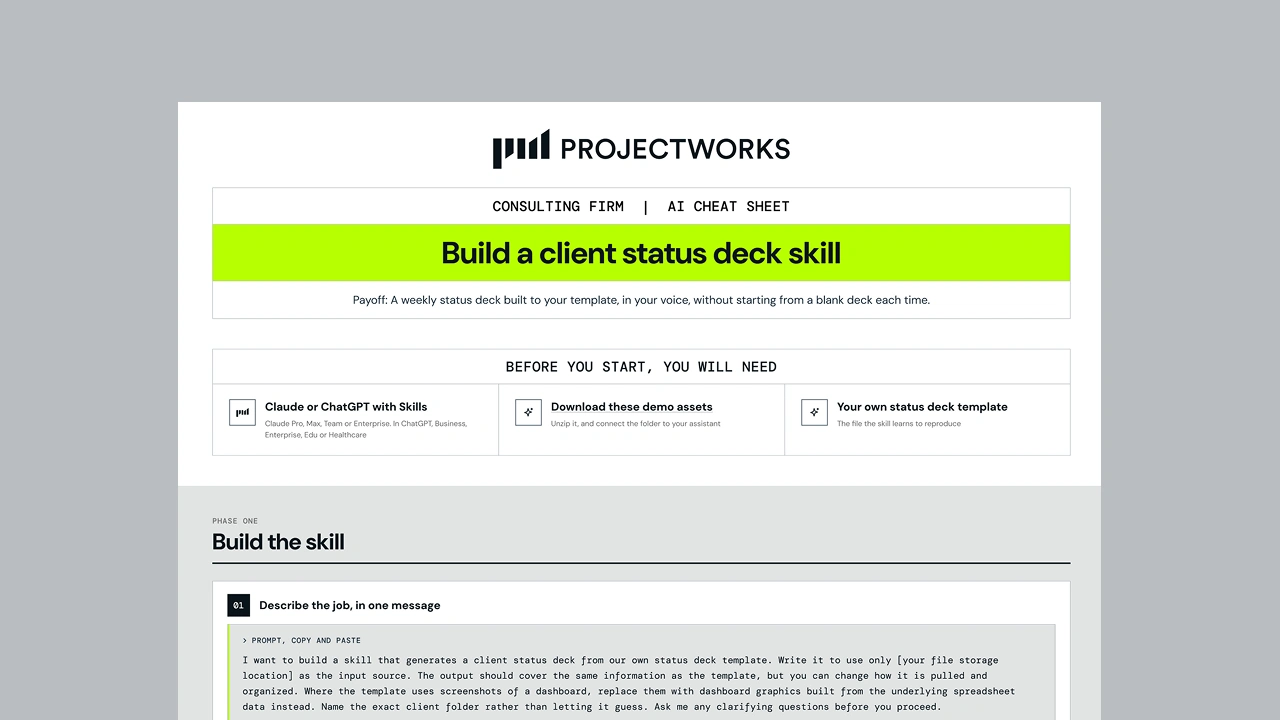
A step-by-step cheat sheet showing consulting firms how to build a Skill in Claude or ChatGPT that turns project data into a client status deck.

By
Jacob Lawrie
September 28, 2026
Downloads
Ready for the next step?

Start a free trial and try Projectworks for yourself. No credit card needed, and you'll be up and running in no time.