Integrate Your Time Tracking Software with Your Outlook Calendar for Accurate Timesheets
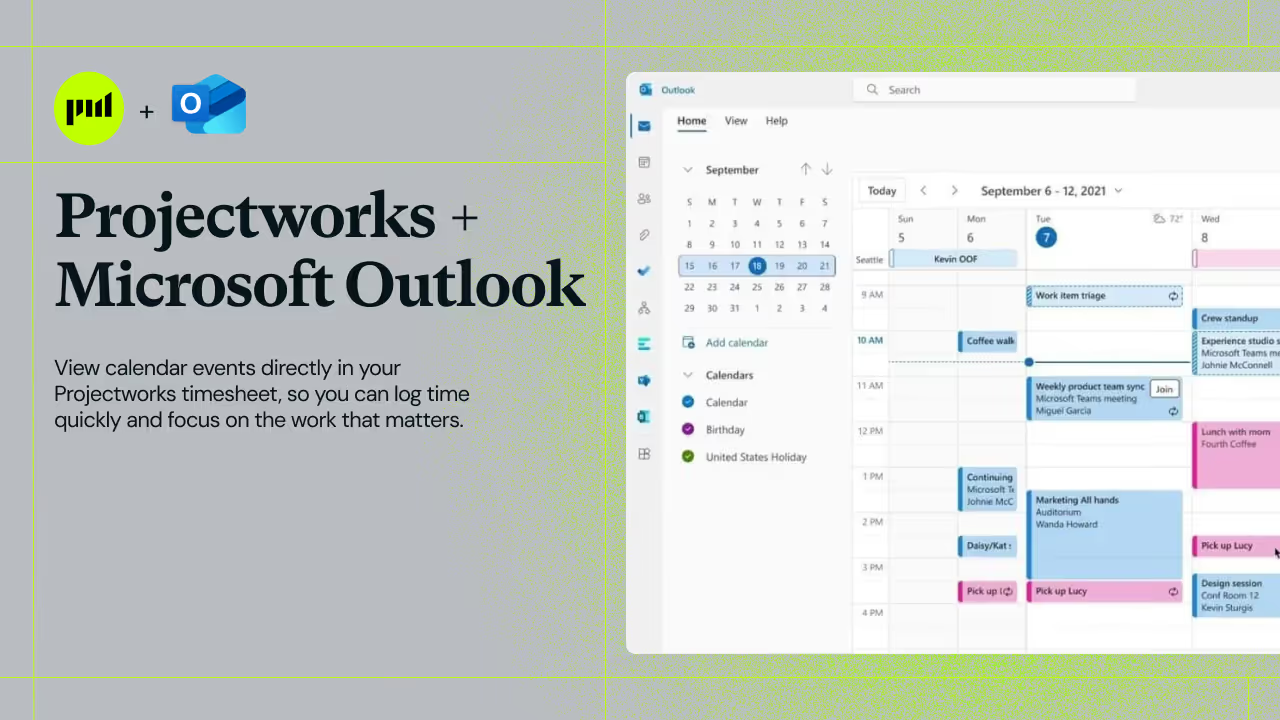



Sick of seeing your meetings in your calendar and wishing they'd just magically port over to your timesheet? Well, now they can! We've launched our latest integration with Microsoft Outlook, so you can see your calendar events in your Projectworks timesheet, and easily assign them to your timecodes.
Connect Projectworks and Outlook Calendar for Accurate Time Logs
Projectworks now integrates directly with the Outlook calendar, bringing your calendar events to your Timesheet, increasing accuracy and making Timesheet approval easier.
Best for: Anyone who logs time in Projectworks and uses Microsoft Outlook Calendar.
When to use: Any time you want to log time more accurately and with less effort.
Easily Recollect and Record Your Day
Remembering exactly what you worked on and for how long is one of the challenges in accurate time tracking. With the Projectworks Outlook integration, your calendar events pull directly into your Timesheet.
Assign each event to a Timecode, and the duration and comment are automatically populated. No reconstructing your day from memory. No manually typing out task descriptions.
If a meeting ran over, or the event title lacks context, edit the Time Entry before submitting.
The quick wins for your team:
- More accurate Time Entries that reflect real work delivered
- Fewer Timesheets requiring edits after submission
- Faster Timesheet approval for managers
Small Details That Make a Big Difference
The Outlook integration is designed with a few features that make daily use even smoother.
Color coding: The integration brings your color coded categories with it. If you've built a color system around your clients or projects in Outlook, that same logic flows directly into your Timesheet. For busy consultants juggling multiple engagements, these visual cues make it easy to spot and assign events at a glance.
Toggle on/off: You're always in control. If you don't want your Outlook events displayed in your Timesheet on a given day, simply switch the calendar toggle off. It's a small but handy way to tailor your workspace to suit your needs.
Minimize as it suits: If you only use your Outlook calendar events to create some of your time entries, simply minimize your calendar events, so that they are not always displayed.
Assign multiple events to one time entry: If you have five meetings for a single project in one day, no need for five separate Time Entries. Merge them into one, keeping your Timesheet clean without losing any accuracy.
This is how confident firms stay accurate without adding extra effort to their logging process!
Connected Calendars for Accurate, Approvable Timesheets
Don't let admin slow your team down. Bringing your Outlook calendar into Projectworks simplifies the time logging experience for consultants and managers alike.
With the Projectworks Outlook integration, you can:
- Eliminate the guesswork of reconstructing your day from memory
- Automatically populate Time Entry durations and comments from calendar events
- Flexibly merge or separate entries to match client invoicing needs
- Speed up Timesheet submission and approval across your team
Learn more about setting up the Outlook integration in our Help Center.
Stay in the Loop
Want to stay up-to-date with Projectworks product updates as they drop? Make sure to check our Release Notes regularly - we update these every 2 weeks. To get monthly updates straight to your inbox, sign up to our product mailing list.


Read similar resources from Projectworks

It's the end of September and expenses got a lot of love this month, with a couple of big changes you can start using today and more on the way! We've also made updates across financial reporting, resourcing, HubSpot, and invoicing, dive in to see what's new.
PSA software with built-in CRM, or a separate CRM? For consulting firms, one system usually wins. Here's why.
.png)
This is your guide to all the updates across Projectworks in the month of August. There's new and updated integrations, upgraded resourcing and the opportunity to join early access to Kea, our AI Agent - something for everyone!