resources
BLOG
Product Updates

Projectworks Product Update: April 2025


No items found.
Go deeper
Download our professional services ‘cheat sheet’ now

🔍 Coming from the May 2025 newsletter and looking for the May releases? Find them here.

Fill or reduce timesheet to capacity

We all have to deal with timesheets in professional services. Our philosophy at Projectworks is that timesheets should be as simple as possible, so you spend more time on the work you actually care about.

24.1% of professional services experts feel their timesheets aren't entered in a timely and accurate manner.

With our latest feature, we’ve made filling your timesheet in as simple as one click.

If most of your time is spent working on the same timecode, you can select “Fill to capacity” or “Reduce to capacity” in Projectworks to complete your timesheet. This saves you time and kicks a little more busywork to the curb!

Learn more about automatically filling timesheets.


💡Projectworks tip: Custom cost rates by project or time code

All people are able to have costs associated with them within their profile in Projectworks. These costs are set up with start and end dates, and will apply to all time entries and resourcing for that person during the given period.

If you would like to be more precise with your people costs, you can also set costs for an individual by project or a time code on a project, meaning an individual can be operating with different cost rates simultaneously.

To do this, you'll need to create a cost rate card. Navigate to the Settings 'cog' icon in Projectworks > Finance > Cost Rate Cards > select the blue '+' button. Cost rate cards are made available to people who are set up as "Hourly" in their employment details.

Set up a new custom rate card in Projectworks in the Finance settings.

Use case: custom rate card

For example, an employee may typically work as a draftsperson with a standard cost rate of $40/hour. However, on a particular project, their cost rate may increase to $60/hour as they are performing the duties of a senior draftsperson and are paid this amount by the business.

Accounting for this with different cost rates by project or time code enables you, as the project manager, to retain a more accurate project margin based on correct cost rate.

Additionally, if you use Xero and export timesheets to Xero from Projectworks, you can use this feature to pay your staff these correct amounts.

Key things to know

  • Cost rate cards can only be applied to "Hourly" workers.
  • You can make a single cost rate card available to multiple people.
  • Cost rate cards are not complicated to set up, but making changes to them should be done with caution as they could impact the reported costs for people on projects.
    • Be aware that changing the rate will not change the cost rate for a person that has already been added to a project or timecode. To refresh the rates for a person for work that is already in flight you will need to reselect the cost rate card and the new rate will be applied. The new rate will be used when adding a person to something for the first time.
  • We recommend you create a new Cost Rate Card if the rate changes, making the original one inactive if it will no longer be used.

❤️ Love Projectworks?

Help us spread the word and leave us a G2 review!


Stay in the loop

Want to stay up-to-date with Projectworks product updates as they drop? Make sure to check our Release Notes regularly - we update these every 2 weeks. To get monthly updates straight to your inbox, sign up to our product mailing list.

Share:
learn more

Download our professional services ‘cheat sheet’.

Whether you’re at $5M, $15M, or $50M, this cheat sheet maps the moves that separate firms who stall from firms who scale.

UP next:
By subscribing you agree with our Privacy Policy.
Thank you! Your submission has been received!
Oops! Something went wrong while submitting the form.
Keep reading

Read similar resources from Projectworks

Building Provoke: From 0-150 Staff
resource type

In a recent Projectworks Podcast episode, Doug Taylor (who co-founded Provoke and scaled it to 150 staff) sat down with Mark Orttung (who took Nexient from $30m to $130m). Together, they co-wrote The $50 Million Consulting Firm, and in this episode they shared a collection of lessons they wish they'd had earlier when scaling their software consulting firms.

Jacob Lawrie
April 20, 2026
resource type
resource type

Novigi has an impressive story. Since launching in 2016, they’ve scaled to 550 staff across six offices and two countries, while becoming the fastest-growing professional services firm on the AFR Fast 100 - their story is worth studying.

Bernadette Keating
April 9, 2026
resource type
resource type

”When new work comes in, we have the right people, ready to go. Winning work and protecting the team, we never have to choose just one.” How often can you confidently say the same? Facing resourcing questions about upcoming projects can sound simple, but if your schedules are built on assumptions and capacity is only estimated, face it, your resource planning is under-engineered!

Bernadette Keating
April 12, 2026
resource type
Product Updates
Product Update

Projectworks Product Update: April 2025

By
Charlotte Steel
29.4.2025
Projectworks Product Update: April 2025

Discover our latest release - kick admin to the curb by filling or reducing your timesheet to capacity with one click. Plus, revisit custom cost rates by project and time code to achieve more accurate project margins.

🔍 Coming from the May 2025 newsletter and looking for the May releases? Find them here.

Fill or reduce timesheet to capacity

We all have to deal with timesheets in professional services. Our philosophy at Projectworks is that timesheets should be as simple as possible, so you spend more time on the work you actually care about.

24.1% of professional services experts feel their timesheets aren't entered in a timely and accurate manner.

With our latest feature, we’ve made filling your timesheet in as simple as one click.

If most of your time is spent working on the same timecode, you can select “Fill to capacity” or “Reduce to capacity” in Projectworks to complete your timesheet. This saves you time and kicks a little more busywork to the curb!

Learn more about automatically filling timesheets.


💡Projectworks tip: Custom cost rates by project or time code

All people are able to have costs associated with them within their profile in Projectworks. These costs are set up with start and end dates, and will apply to all time entries and resourcing for that person during the given period.

If you would like to be more precise with your people costs, you can also set costs for an individual by project or a time code on a project, meaning an individual can be operating with different cost rates simultaneously.

To do this, you'll need to create a cost rate card. Navigate to the Settings 'cog' icon in Projectworks > Finance > Cost Rate Cards > select the blue '+' button. Cost rate cards are made available to people who are set up as "Hourly" in their employment details.
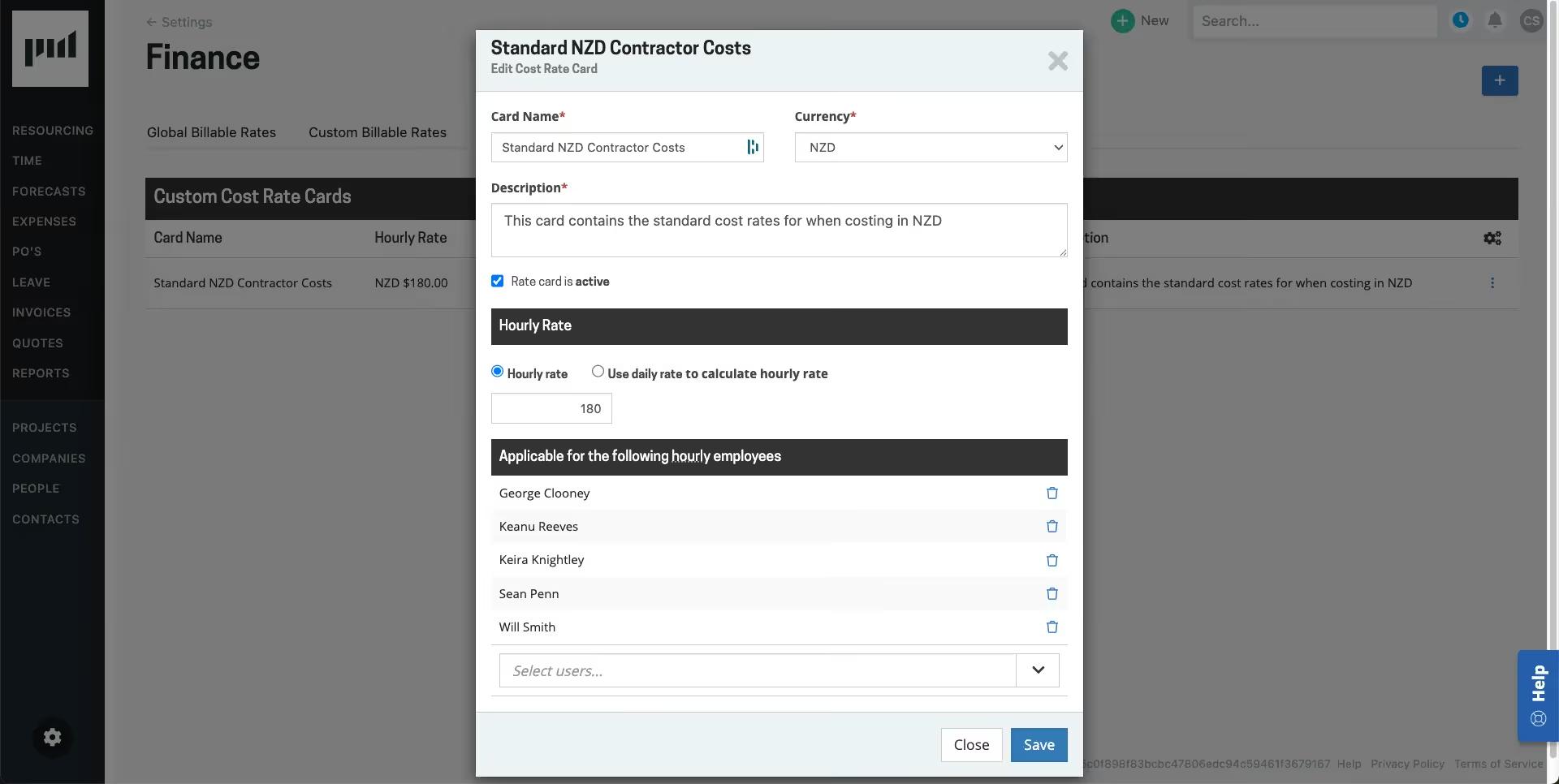
Set up a new custom rate card in Projectworks in the Finance settings.

Use case: custom rate card

For example, an employee may typically work as a draftsperson with a standard cost rate of $40/hour. However, on a particular project, their cost rate may increase to $60/hour as they are performing the duties of a senior draftsperson and are paid this amount by the business.

Accounting for this with different cost rates by project or time code enables you, as the project manager, to retain a more accurate project margin based on correct cost rate.

Additionally, if you use Xero and export timesheets to Xero from Projectworks, you can use this feature to pay your staff these correct amounts.

Key things to know

  • Cost rate cards can only be applied to "Hourly" workers.
  • You can make a single cost rate card available to multiple people.
  • Cost rate cards are not complicated to set up, but making changes to them should be done with caution as they could impact the reported costs for people on projects.
    • Be aware that changing the rate will not change the cost rate for a person that has already been added to a project or timecode. To refresh the rates for a person for work that is already in flight you will need to reselect the cost rate card and the new rate will be applied. The new rate will be used when adding a person to something for the first time.
  • We recommend you create a new Cost Rate Card if the rate changes, making the original one inactive if it will no longer be used.

❤️ Love Projectworks?

Help us spread the word and leave us a G2 review!


Stay in the loop

Want to stay up-to-date with Projectworks product updates as they drop? Make sure to check our Release Notes regularly - we update these every 2 weeks. To get monthly updates straight to your inbox, sign up to our product mailing list.


Join our professional services community

Subscribe for the latest updates delivered straight to your inbox.

By subscribing you agree with our Privacy Policy.
Enjoying this article?
Share it with the world!

Related Articles

5 Lessons on Scaling a Consulting Firm, from the Founder of Provoke
Consulting Advice
Z Suite
,
Growth

5 Lessons on Scaling a Consulting Firm, from the Founder of Provoke

In a recent Projectworks Podcast episode, Doug Taylor (who co-founded Provoke and scaled it to 150 staff) sat down with Mark Orttung (who took Nexient from $30m to $130m). Together, they co-wrote The $50 Million Consulting Firm, and in this episode they shared a collection of lessons they wish they'd had earlier when scaling their software consulting firms.

Turning an Operational Discipline Into a Growth Engine
Consulting Advice
Z Suite

Turning an Operational Discipline Into a Growth Engine

Novigi has an impressive story. Since launching in 2016, they’ve scaled to 550 staff across six offices and two countries, while becoming the fastest-growing professional services firm on the AFR Fast 100 - their story is worth studying.

Double Your Revenue Growth With Effective Resource Planning
Resource Management
Revenue
,
Growth

Double Your Revenue Growth With Effective Resource Planning

Your sales pipeline and marketing funnel are important as a source of leads and revenue, but the real driver of growth for your consulting firm may be from an unexpected source: effective resource planning. Building an efficient lead-to-close system will drive revenue, but if you can’t deliver the work efficiently and profitably, your firm isn’t actually growing; it’s just getting more busy.