resources
BLOG
Product Updates

Projectworks Product Update: January 2025

Product Update
Go deeper
Download our professional services ‘cheat sheet’ now

The holidays are over, and the working year is in full swing! 2025 will be a year of continued growth for Projectworks. We’re looking forward to bringing you:

  • advanced reporting;
  • budget, resourcing, and time entry enhancements (including changes to how the platform looks and feels);
  • and a new Employment Hero leave integration;

among many other updates and improvements.

Stay up-to-date with the latest in Projectworks

Because we’ll be releasing so often, we want to keep you in the loop. Sign up to our new monthly product update from Charlotte, our Product Marketing Manager, to take advantage of the latest features in Projectworks as they drop. You’ll also receive sneak peeks of upcoming features, and have the opportunity to provide feedback on planned releases.


Looking back on 2024: Purchase orders

We’ve got a packed release schedule for 2025 - but before we get into the year, we wanted to highlight a feature that may have slipped by unnoticed in 2024.

Purchase Orders moved out of beta in July 2024, and they fulfil a key function for businesses who work with external suppliers.

Purchase orders 101: What are they?

A purchase order (PO) is a document sent to a supplier to purchase goods and/or services. They document what you intend to purchase and record your transaction, meaning you have complete visibility over your finances. Your purchase order records also let you track how supplier costs change over time.

You can easily create, receipt, email, download, and export purchase orders in Projectworks.

Benefits of purchase orders in Projectworks

Complete control over your finances

To save time, you can create a purchase order from a template in Projectworks and auto-populate it with the relevant supplier from your accounting system.

Purchase orders are considered a cost against your project. You have the choice to make the order amount (incl./excl. tax) billable or non-billable to your customer, as well as add a markup or markdown.

A key difference between purchase orders and expenses is that you can include multiple line items in a single purchase order (it essentially operates as a group of expenses).

Seamless communication with suppliers

Once you’re happy with your purchase order, you can send it to your supplier directly from Projectworks! Simply enter the supplier email address and hit “Send Email”.

You can even send purchase orders in bulk if you wish.

Once sent, the order status is tracked in Projectworks - so you can be confident you’re up-to-date.

Visibility into purchase order progress

Since purchase orders can be critical for project delivery, it's important to be able to see what items have been receipted (i.e. what suppliers have delivered and/or billed against them).

In Projectworks, you have total flexibility over receipting purchase orders - you can fully receipt a line item or multiple items, with the option to add supporting attachments (like supplier invoices). Importantly, you can also partially receipt an individual line item if a supplier has delivered or billed only part of a specific item. Simply adjust the amount or quantity in the form!

By managing your purchase orders in Projectworks, you can track exactly where specific orders are at in terms of expected delivery date & percentage delivered - helping you run your projects more effectively overall.

Deep integration with Xero and QuickBooks

Save on time and admin by exporting a Projectworks purchase order to Xero or QuickBooks Online as a bill to pay.

Even better, you can reconcile payments against the purhcase order - it’s a two-way sync!

You’ll have a solid understanding of outstanding liabilities, and your project costs will be up-to-date.

Export partly- or fully-receipted purchase orders to Xero.

Ensure excellent business process with audit logging

Projectworks offers extensive audit logging for purchase orders. The “History” page contains details of saved changes for each order, when it was actioned, and by whom. You will also be able to see all the internal comments entered against the order.

Manage your orders in one place

We understand that a single project can generate a large number of purchase orders - and often, you’re running multiple projects! So we’ve made sure to make them easy to manage.

Each purchase order has a unique ID number. You can find purchase orders by name and ID number using global search, and filter/group them by an extensive range of parameters, including:

  • Status
  • Exported
  • Paid
  • Invoiced
  • Supplier
  • Project
  • Project Manager
  • Expected Date

How to enable purchase orders

To begin using the purchase order feature in Projectworks, you must:

  1. Integrate with Xero or QuickBooks Online;
  2. Enable expenses (Xero | QuickBooks);
  3. Adjust Access Levels to enable the feature for specific access level users;
  4. Adjust any other purchase order-related settings to suit your business needs (templates, attachment requirements, & email content).

For any further questions about purchase orders, you can review our detailed help information here or contact [email protected].


Feedback wanted

We're actively working on enhanced resourcing and project schedules in Projectworks. If you’re a current user and would like to preview the proposed changes and help shape their development, book a review session with Vijay Raghuraman, Product Manager. Your expertise helps us create a better platform for professional services.


Stay in the loop

Want to stay up-to-date with Projectworks product updates as they drop? Make sure to check our Release Notes regularly - we update these every 2 weeks. To get monthly updates straight to your inbox, sign up to our product mailing list.

If you’re not already using Projectworks, why not get started today? Our free trial lets you use all of Projectworks' features for 21 days, no strings attached. Learn how you can grow your business and join hundreds of professional services businesses scaling for success.

An image that reads, "Projectworks" and "The easiest-to-use professional services automation software" with a screenshot of the Projectworks interface. The call-to-action reads, "Start an instant free trial".

Share:
learn more

Download our professional services ‘cheat sheet’.

Whether you’re at $5M, $15M, or $50M, this cheat sheet maps the moves that separate firms who stall from firms who scale.

UP next:
By subscribing you agree with our Privacy Policy.
Thank you! Your submission has been received!
Oops! Something went wrong while submitting the form.
Keep reading

Read similar resources from Projectworks

Building Provoke: From 0-150 Staff
resource type

In a recent Projectworks Podcast episode, Doug Taylor (who co-founded Provoke and scaled it to 150 staff) sat down with Mark Orttung (who took Nexient from $30m to $130m). Together, they co-wrote The $50 Million Consulting Firm, and in this episode they shared a collection of lessons they wish they'd had earlier when scaling their software consulting firms.

Jacob Lawrie
April 20, 2026
resource type
resource type

Novigi has an impressive story. Since launching in 2016, they’ve scaled to 550 staff across six offices and two countries, while becoming the fastest-growing professional services firm on the AFR Fast 100 - their story is worth studying.

Bernadette Keating
April 9, 2026
resource type
resource type

”When new work comes in, we have the right people, ready to go. Winning work and protecting the team, we never have to choose just one.” How often can you confidently say the same? Facing resourcing questions about upcoming projects can sound simple, but if your schedules are built on assumptions and capacity is only estimated, face it, your resource planning is under-engineered!

Bernadette Keating
April 12, 2026
resource type
Product Updates
Product Update

Projectworks Product Update: January 2025

By
Charlotte Steel
28.1.2025
Projectworks Product Update: January 2025

We’re launching a new monthly product update to keep you up-to-date with the latest in Projectworks. Plus - did you miss our purchase order feature? Here’s everything you need to know.

The holidays are over, and the working year is in full swing! 2025 will be a year of continued growth for Projectworks. We’re looking forward to bringing you:

  • advanced reporting;
  • budget, resourcing, and time entry enhancements (including changes to how the platform looks and feels);
  • and a new Employment Hero leave integration;

among many other updates and improvements.

Stay up-to-date with the latest in Projectworks

Because we’ll be releasing so often, we want to keep you in the loop. Sign up to our new monthly product update from Charlotte, our Product Marketing Manager, to take advantage of the latest features in Projectworks as they drop. You’ll also receive sneak peeks of upcoming features, and have the opportunity to provide feedback on planned releases.


Looking back on 2024: Purchase orders

We’ve got a packed release schedule for 2025 - but before we get into the year, we wanted to highlight a feature that may have slipped by unnoticed in 2024.

Purchase Orders moved out of beta in July 2024, and they fulfil a key function for businesses who work with external suppliers.

Purchase orders 101: What are they?

A purchase order (PO) is a document sent to a supplier to purchase goods and/or services. They document what you intend to purchase and record your transaction, meaning you have complete visibility over your finances. Your purchase order records also let you track how supplier costs change over time.
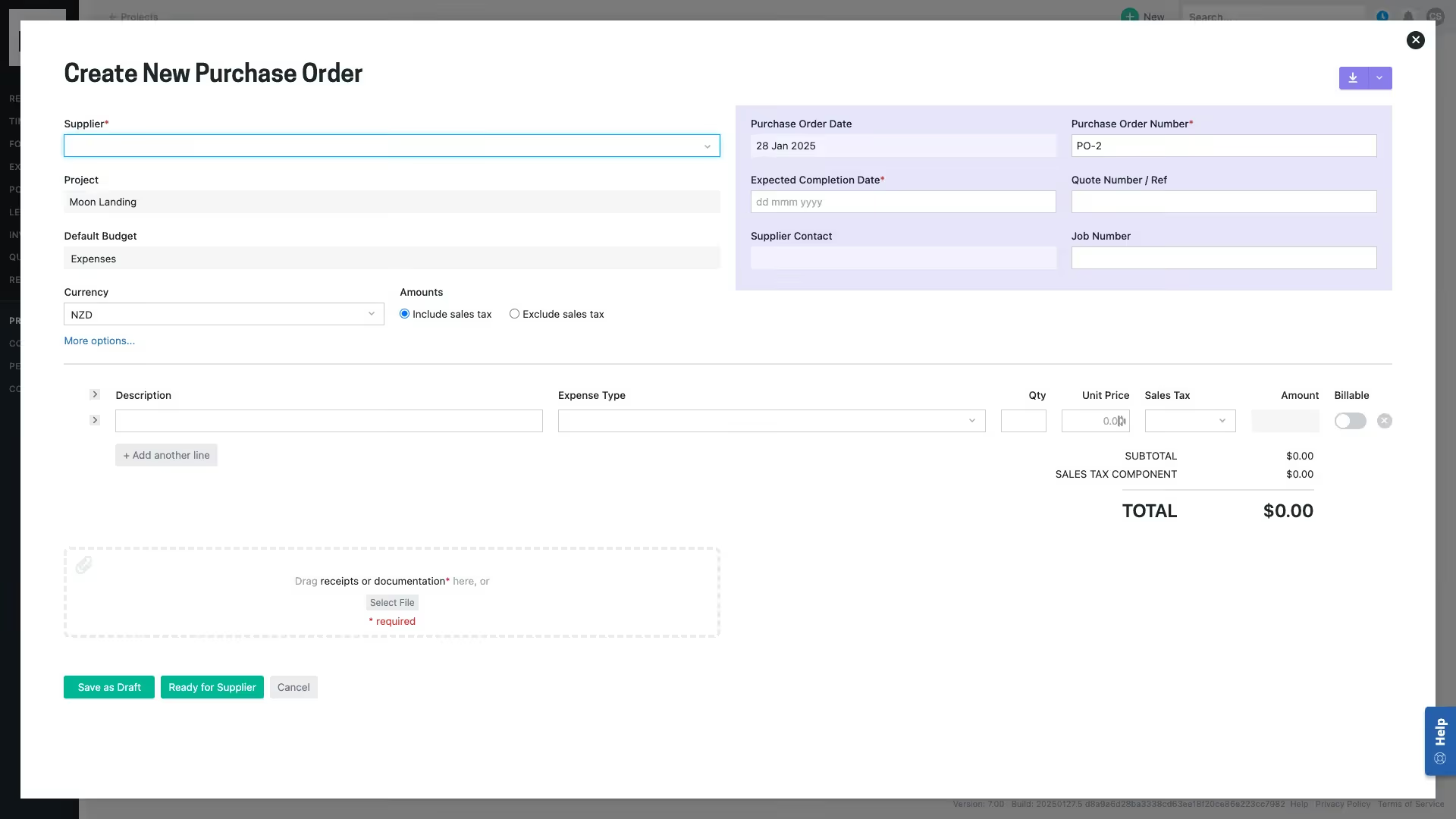
You can easily create, receipt, email, download, and export purchase orders in Projectworks.

Benefits of purchase orders in Projectworks

Complete control over your finances

To save time, you can create a purchase order from a template in Projectworks and auto-populate it with the relevant supplier from your accounting system.

Purchase orders are considered a cost against your project. You have the choice to make the order amount (incl./excl. tax) billable or non-billable to your customer, as well as add a markup or markdown.

A key difference between purchase orders and expenses is that you can include multiple line items in a single purchase order (it essentially operates as a group of expenses).

Seamless communication with suppliers

Once you’re happy with your purchase order, you can send it to your supplier directly from Projectworks! Simply enter the supplier email address and hit “Send Email”.

You can even send purchase orders in bulk if you wish.

Once sent, the order status is tracked in Projectworks - so you can be confident you’re up-to-date.

Visibility into purchase order progress

Since purchase orders can be critical for project delivery, it's important to be able to see what items have been receipted (i.e. what suppliers have delivered and/or billed against them).

In Projectworks, you have total flexibility over receipting purchase orders - you can fully receipt a line item or multiple items, with the option to add supporting attachments (like supplier invoices). Importantly, you can also partially receipt an individual line item if a supplier has delivered or billed only part of a specific item. Simply adjust the amount or quantity in the form!

By managing your purchase orders in Projectworks, you can track exactly where specific orders are at in terms of expected delivery date & percentage delivered - helping you run your projects more effectively overall.

Deep integration with Xero and QuickBooks

Save on time and admin by exporting a Projectworks purchase order to Xero or QuickBooks Online as a bill to pay.

Even better, you can reconcile payments against the purhcase order - it’s a two-way sync!

You’ll have a solid understanding of outstanding liabilities, and your project costs will be up-to-date.
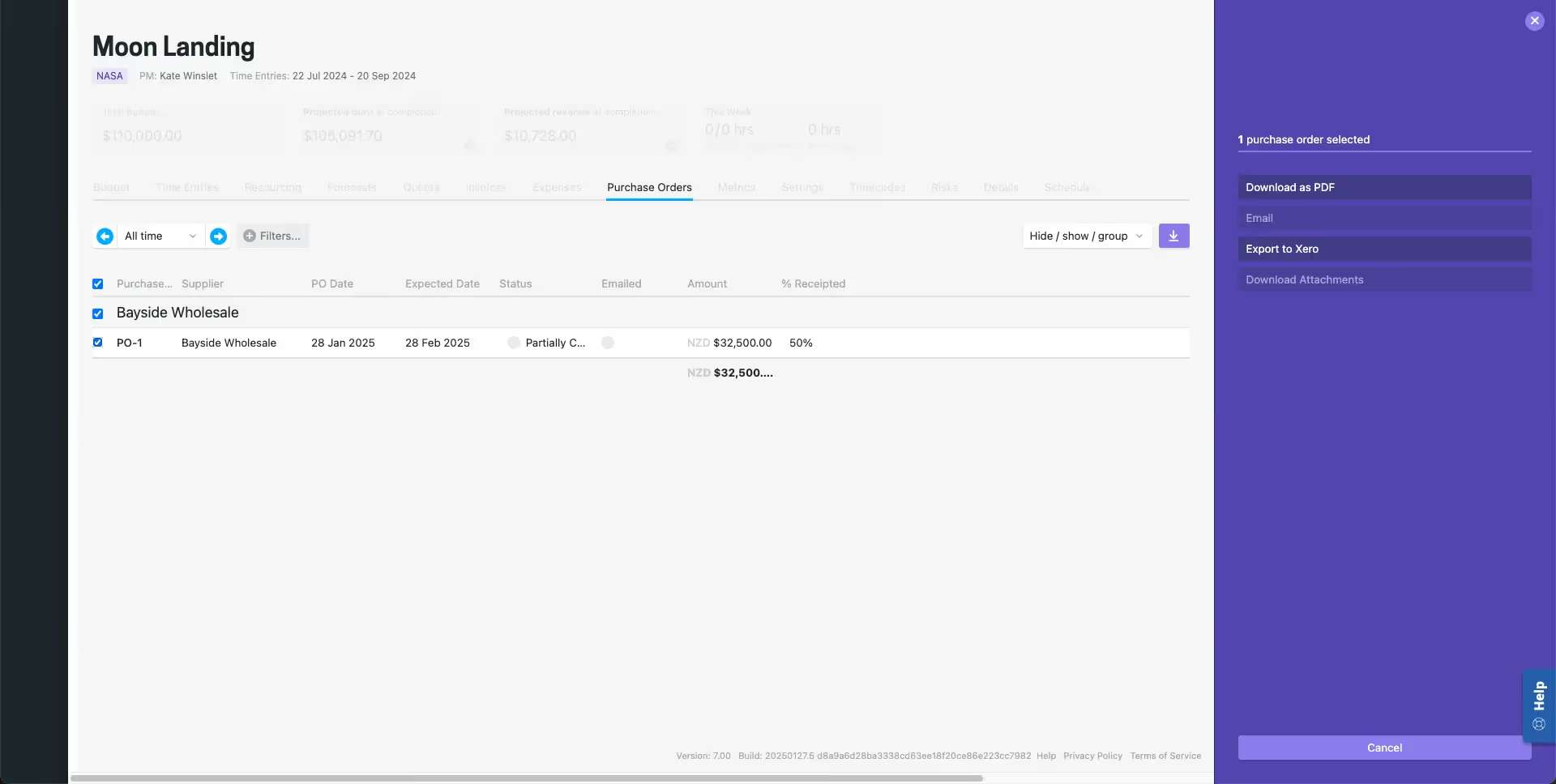
Export partly- or fully-receipted purchase orders to Xero.

Ensure excellent business process with audit logging

Projectworks offers extensive audit logging for purchase orders. The “History” page contains details of saved changes for each order, when it was actioned, and by whom. You will also be able to see all the internal comments entered against the order.

Manage your orders in one place

We understand that a single project can generate a large number of purchase orders - and often, you’re running multiple projects! So we’ve made sure to make them easy to manage.

Each purchase order has a unique ID number. You can find purchase orders by name and ID number using global search, and filter/group them by an extensive range of parameters, including:

  • Status
  • Exported
  • Paid
  • Invoiced
  • Supplier
  • Project
  • Project Manager
  • Expected Date

How to enable purchase orders

To begin using the purchase order feature in Projectworks, you must:

  1. Integrate with Xero or QuickBooks Online;
  2. Enable expenses (Xero | QuickBooks);
  3. Adjust Access Levels to enable the feature for specific access level users;
  4. Adjust any other purchase order-related settings to suit your business needs (templates, attachment requirements, & email content).

For any further questions about purchase orders, you can review our detailed help information here or contact [email protected].


Feedback wanted

We're actively working on enhanced resourcing and project schedules in Projectworks. If you’re a current user and would like to preview the proposed changes and help shape their development, book a review session with Vijay Raghuraman, Product Manager. Your expertise helps us create a better platform for professional services.


Stay in the loop

Want to stay up-to-date with Projectworks product updates as they drop? Make sure to check our Release Notes regularly - we update these every 2 weeks. To get monthly updates straight to your inbox, sign up to our product mailing list.

If you’re not already using Projectworks, why not get started today? Our free trial lets you use all of Projectworks' features for 21 days, no strings attached. Learn how you can grow your business and join hundreds of professional services businesses scaling for success.

An image that reads, "Projectworks" and "The easiest-to-use professional services automation software" with a screenshot of the Projectworks interface. The call-to-action reads, "Start an instant free trial".

Join our professional services community

Subscribe for the latest updates delivered straight to your inbox.

By subscribing you agree with our Privacy Policy.
Enjoying this article?
Share it with the world!

Related Articles

5 Lessons on Scaling a Consulting Firm, from the Founder of Provoke
Consulting Advice
Z Suite
,
Growth

5 Lessons on Scaling a Consulting Firm, from the Founder of Provoke

In a recent Projectworks Podcast episode, Doug Taylor (who co-founded Provoke and scaled it to 150 staff) sat down with Mark Orttung (who took Nexient from $30m to $130m). Together, they co-wrote The $50 Million Consulting Firm, and in this episode they shared a collection of lessons they wish they'd had earlier when scaling their software consulting firms.

Turning an Operational Discipline Into a Growth Engine
Consulting Advice
Z Suite

Turning an Operational Discipline Into a Growth Engine

Novigi has an impressive story. Since launching in 2016, they’ve scaled to 550 staff across six offices and two countries, while becoming the fastest-growing professional services firm on the AFR Fast 100 - their story is worth studying.

Double Your Revenue Growth With Effective Resource Planning
Resource Management
Revenue
,
Growth

Double Your Revenue Growth With Effective Resource Planning

Your sales pipeline and marketing funnel are important as a source of leads and revenue, but the real driver of growth for your consulting firm may be from an unexpected source: effective resource planning. Building an efficient lead-to-close system will drive revenue, but if you can’t deliver the work efficiently and profitably, your firm isn’t actually growing; it’s just getting more busy.