resources
BLOG
Resource Management

How To Calculate Your Utilization Rate

How to calculate your utilization rate
Professional Services 101
Resourcing
How to calculate your utilization rate
Go deeper
Download our professional services ‘cheat sheet’ now

Utilization is a crucial metric for consultancies seeking to monitor how effectively they're using their team's time, and ultimately grow profitability.

In this article, we'll delve into why utilization rates are important for professional service firms, the manual utilization rate formula, and the benefits of leveraging automation through PSA software thats been designed for professional services industries such as engineers, software services, architects and consultants.

What Is A Utilization Rate At A Professional Service Firm?

Utilization measures how much time a consultancy's team spends on billable work, usually shown as a percentage. The calculation involves comparing billable hours to total hours worked. A high employee utilization rate indicates that professionals are effectively maximizing their time on revenue-generating activities, contributing to the profitability of projects and ensuring optimal resource utilization.

How Can I Measure My Utilization?

To measure an individual's utilization, you’ll need 2 things: the number of billable hours they worked and how many hours they are resourced.

Utilization rate calculation: billable hours ÷ total hours x 100 = utilization rate.

For example, if one employee submits 36 hours of billable time for their 40-hour week, their utilization would be 90%.

Example calculation: 36 ÷ 40 x 100 = 90.
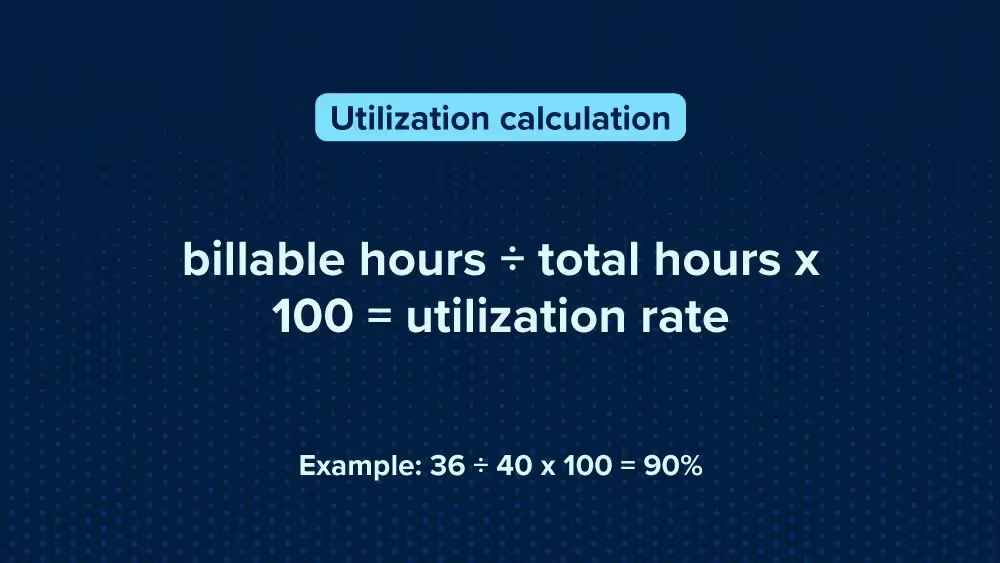
Utilization rate = billable hours / total hours * 100

If you want to know your whole company's utilization rate, you want to multiply all employee's rates and divide them by the number of employees.

Calculation: UR (utilization rate) x UR x UR x UR ÷ 4 = average utilization rate.

Where PSA Software Changes The Game: Automatically Measure Utilization Rates

Use PSA software to quickly monitor utilization rate rates for individuals, projects, and companies.

It does this with the data submitted by employees on timesheets and your resourcing plan, saving you time on manual calculations while still allowing you to keep an eye on your people's productivity. It also allows you to define individual targets for your people, which is useful for setting realistic expectations.

Your leaders may have a lower goal because they handle tasks that don't generate income, such as managing their team members. However, these tasks are necessary for your business. In contrast, you might assign higher targets to junior employees, expecting them to spend most of their time on billable work. By using PSA software, you can optimize your utilization rate across all levels of your firm.

How Resource Management Software Can Help Improve Your Utilization Rate

Resource management software within your PSA tool lifts utilization by turning guesswork into live, portfolio-wide visibility. Capacity heatmaps show who’s over or under-loaded, skills and role tags match demand to the right people, and leave/calendar integrations keep plans realistic.

With placeholder roles you can reserve capacity early, then swap to named staff without rebuilding the schedule. Scenario planning helps you compare options (hire, defer, subcontract) before committing, while actuals flowing in from timesheets tighten forecasts.

The result: smoother allocation, fewer bench hours, and a sustained uptick in utilization rate.

A High Utilization Rate Will Contribute Towards Your Consulting Firm's Growth

In summary, understanding your utilization is important for consultancies aiming to improve the profitability of their firm, and utlimately their growth rate.

“Projectworks allowed me to drill down into finances at the project level, person level, and company level. I could see what was working, and what needed to change much faster than before.” Charles Camp, Managing Director (UK & EU) & Chief Financial Officer, Scendea
See how Scendea have grown 168% using Projectworks

If you are curious about what a good utilization rate is for your unique business model, click here to check out our article on benchmarks for professional services firms.

If you're interested in seeing Projectworks PSA software in action, book a demo for your professional services firm today.
Share:
learn more

Download our professional services ‘cheat sheet’.

Whether you’re at $5M, $15M, or $50M, this cheat sheet maps the moves that separate firms who stall from firms who scale.

UP next:
By subscribing you agree with our Privacy Policy.
Thank you! Your submission has been received!
Oops! Something went wrong while submitting the form.
Keep reading

Read similar resources from Projectworks

resource type

This month we caught April Fools fever and dreamed up ‘Timeless Mode' as a way to help you with all your time problems. Before we got too carried away though, there was an exciting pace to the new features and value added to Projectworks this month. Don’t sleep on the BambooHR integration, bulk expense import or monthly view of Resourcing by Availability. Plus register to join us virtually in May for all things AI and consulting, it’s going to be a great discussion!

Bernadette Keating
April 28, 2026
resource type
Photo of consultant at work with headline reading Top 10 PSA Tools October 2025
resource type

Professional Services Automation software enables professional services organizations to effectively manage their consultants and drive profitable project delivery.

Charlotte Steel
October 15, 2025
resource type
Building Provoke: From 0-150 Staff
resource type

In a recent Projectworks Podcast episode, Doug Taylor (who co-founded Provoke and scaled it to 150 staff) sat down with Mark Orttung (who took Nexient from $30m to $130m). Together, they co-wrote The $50 Million Consulting Firm, and in this episode they shared a collection of lessons they wish they'd had earlier when scaling their software consulting firms.

Jacob Lawrie
April 20, 2026
resource type
Resource Management
Professional Services 101
,
Project Management

How To Calculate Your Utilization Rate

By
Jacob Lawrie
14.10.2024
How To Calculate Your Utilization Rate

Measure your team's productivity by learning to calculate your firm's utilization rate. Pro tip: PSA software calculates it for you, helping you to make the most of your people and grow your consulting firm's profitability.

Utilization is a crucial metric for consultancies seeking to monitor how effectively they're using their team's time, and ultimately grow profitability.

In this article, we'll delve into why utilization rates are important for professional service firms, the manual utilization rate formula, and the benefits of leveraging automation through PSA software thats been designed for professional services industries such as engineers, software services, architects and consultants.

What Is A Utilization Rate At A Professional Service Firm?

Utilization measures how much time a consultancy's team spends on billable work, usually shown as a percentage. The calculation involves comparing billable hours to total hours worked. A high employee utilization rate indicates that professionals are effectively maximizing their time on revenue-generating activities, contributing to the profitability of projects and ensuring optimal resource utilization.

How Can I Measure My Utilization?

To measure an individual's utilization, you’ll need 2 things: the number of billable hours they worked and how many hours they are resourced.

Utilization rate calculation: billable hours ÷ total hours x 100 = utilization rate.

For example, if one employee submits 36 hours of billable time for their 40-hour week, their utilization would be 90%.

Example calculation: 36 ÷ 40 x 100 = 90.

Utilization rate = billable hours / total hours * 100

If you want to know your whole company's utilization rate, you want to multiply all employee's rates and divide them by the number of employees.

Calculation: UR (utilization rate) x UR x UR x UR ÷ 4 = average utilization rate.

Where PSA Software Changes The Game: Automatically Measure Utilization Rates

Use PSA software to quickly monitor utilization rate rates for individuals, projects, and companies.

It does this with the data submitted by employees on timesheets and your resourcing plan, saving you time on manual calculations while still allowing you to keep an eye on your people's productivity. It also allows you to define individual targets for your people, which is useful for setting realistic expectations.

Your leaders may have a lower goal because they handle tasks that don't generate income, such as managing their team members. However, these tasks are necessary for your business. In contrast, you might assign higher targets to junior employees, expecting them to spend most of their time on billable work. By using PSA software, you can optimize your utilization rate across all levels of your firm.

How Resource Management Software Can Help Improve Your Utilization Rate

Resource management software within your PSA tool lifts utilization by turning guesswork into live, portfolio-wide visibility. Capacity heatmaps show who’s over or under-loaded, skills and role tags match demand to the right people, and leave/calendar integrations keep plans realistic.

With placeholder roles you can reserve capacity early, then swap to named staff without rebuilding the schedule. Scenario planning helps you compare options (hire, defer, subcontract) before committing, while actuals flowing in from timesheets tighten forecasts.

The result: smoother allocation, fewer bench hours, and a sustained uptick in utilization rate.

A High Utilization Rate Will Contribute Towards Your Consulting Firm's Growth

In summary, understanding your utilization is important for consultancies aiming to improve the profitability of their firm, and utlimately their growth rate.

“Projectworks allowed me to drill down into finances at the project level, person level, and company level. I could see what was working, and what needed to change much faster than before.” Charles Camp, Managing Director (UK & EU) & Chief Financial Officer, Scendea
See how Scendea have grown 168% using Projectworks

If you are curious about what a good utilization rate is for your unique business model, click here to check out our article on benchmarks for professional services firms.

If you're interested in seeing Projectworks PSA software in action, book a demo for your professional services firm today.

Join our professional services community

Subscribe for the latest updates delivered straight to your inbox.

By subscribing you agree with our Privacy Policy.
Enjoying this article?
Share it with the world!

Related Articles

Projectworks Product Update: April 2026
Product Updates
Product Update

Projectworks Product Update: April 2026

This month we caught April Fools fever and dreamed up ‘Timeless Mode' as a way to help you with all your time problems. Before we got too carried away though, there was an exciting pace to the new features and value added to Projectworks this month. Don’t sleep on the BambooHR integration, bulk expense import or monthly view of Resourcing by Availability. Plus register to join us virtually in May for all things AI and consulting, it’s going to be a great discussion!

5 Lessons on Scaling a Consulting Firm, from the Founder of Provoke
Consulting Advice
Z Suite
,
Growth

5 Lessons on Scaling a Consulting Firm, from the Founder of Provoke

In a recent Projectworks Podcast episode, Doug Taylor (who co-founded Provoke and scaled it to 150 staff) sat down with Mark Orttung (who took Nexient from $30m to $130m). Together, they co-wrote The $50 Million Consulting Firm, and in this episode they shared a collection of lessons they wish they'd had earlier when scaling their software consulting firms.

Turning an Operational Discipline Into a Growth Engine
Consulting Advice
Z Suite

Turning an Operational Discipline Into a Growth Engine

Novigi has an impressive story. Since launching in 2016, they’ve scaled to 550 staff across six offices and two countries, while becoming the fastest-growing professional services firm on the AFR Fast 100 - their story is worth studying.